7.9.2 Quiz Module 7 Troubleshooting Common Network Connectivity Issues Answers
7.9.2 Quiz Module 7 Troubleshooting Common Network Connectivity Issues Answers
The 7.9.2 Quiz Module 7: Troubleshooting Common Network Connectivity Issues Answers is designed to help learners assess and reinforce their understanding of diagnosing and resolving typical network problems in modern environments. This module focuses on essential troubleshooting methodologies, including identifying symptoms, isolating faults, and applying systematic approaches to restore connectivity. By working through these quiz questions and answers, students gain practical insight into common issues such as IP addressing errors, DNS failures, cabling problems, and misconfigured network devices, preparing them to effectively troubleshoot real-world network scenarios.
1. Which statement describes a MAC address?
- It is a number assigned by the Internet Service Provider that changes based on the location of devices.
- It is a temporary identifier assigned to a device every time it joins a new network.
- It is a permanent hardware address hard-coded into a device’s network interface card.
- It is a 32-bit address used by devices to communicate across the internet.
A MAC address is like a fingerprint; it is unique to the device and doesn’t change based on location or network.
2. How does maintaining thorough network documentation benefit network support technicians and organizations?
- It allows technicians to resolve every network issue without troubleshooting.
- It promotes knowledge transfer, consistency, and compliance, reducing downtime and improving support efficiency.
- It allows support technicians to rely less on formal training by referencing quick fixes documented by previous technicians.
- Thorough documentation helps technicians identify insider threats.
Good network documentation helps technicians troubleshoot problems efficiently by offering a clear view of the network structure. It facilitates knowledge transfer when staff changes occur, ensures consistency by standardizing procedures, and helps meet regulatory requirements by providing auditable records. These benefits lead to more reliable and secure network operations.
3. A network technician is reviewing the IPv6 configuration of a router and sees two addresses assigned to the same interface: 2001:db8:34ab::1 and fe80::1c3a:5bff:fe6f:9a2b. Based on this observation, which statement explains the roles of these addresses?
- The 2001:db8:34ab::1 address is a global unicast address used for internet routing, while fe80::1c3a:5bff:fe6f:9a2b is a link-local address used for communication on the local link.
- The 2001:db8:34ab::1 address is reserved for multicast purposes, while fe80::1c3a:5bff:fe6f:9a2b is a unique local address used across multiple links.
- The 2001:db8:34ab::1 address is used to communicate with nearby devices on the local link and is automatically assigned, while fe80::1c3a:5bff:fe6f:9a2b is a globally routable address used for external communications and internet access.
- The fe80::1c3a:5bff:fe6f:9a2b address is an anycast address assigned by the router to all interfaces on the network.
Global Unicast Addresses (GUAs) like 2001:db8::/32 are internet-routable and unique across the globe. Link-Local Addresses (LLAs) starting with fe80::/10 are required on every IPv6-enabled interface and are used for communication on the same local link only.
4. Alec is troubleshooting the network settings on a laptop and uses the ipconfig /all command. The output shows both an IPv4 address and an IPv6 address listed under the Ethernet adapter. Which statement explains why Alec sees both an IPv4 and an IPv6 address on the laptop?
- The IPv4 and IPv6 addresses can only be seen together on certain types of laptops.
- Devices commonly have both IPv4 and IPv6 addresses as IPv6 gradually replaces IPv4.
- The IPv6 address is assigned when the IPv4 address expires.
- IPv6 addresses are only installed by enterprise IT administrators exclusively for internal routing within large corporate networks.
IPv6 was developed to address IPv4 exhaustion, and today, most systems are configured to use both protocols during the transition.
5. Which statement describes how wireless LAN (WLAN) devices use the electromagnetic spectrum?
- WLAN devices transmit and receive data using licensed frequency bands reserved for commercial radio.
- WLAN devices communicate using infrared signals that require a line-of-sight between devices.
- WLAN devices use unlicensed radio frequency bands, specifically 2.4 GHz and 5 GHz, to send and receive data.
- WLAN devices rely exclusively on the 1 GHz frequency band for all wireless communication.
Wireless LAN devices operate on the unlicensed portion of the electromagnetic spectrum – specifically the 2.4 GHz and 5 GHz bands – which allows widespread public access without requiring a license.
6. What role does the Ethernet protocol play in data transmission within a LAN?
- It breaks data into Ethernet frames that include MAC addresses to deliver data between devices on the LAN.
- It encrypts all outgoing traffic using public keys to ensure secure communication between wireless devices.
- It establishes internet connections by assigning IP addresses to external websites.
- It compresses video and audio files for faster transmission over long-distance networks.
Ethernet enables data transfer within a LAN by dividing data into Ethernet frames. These frames contain the MAC addresses of the sender and receiver, ensuring accurate delivery across the local network.
7. What is true about autonomous access points (APs)?
- They are centrally managed using cloud-based software.
- They require a wireless controller to function properly.
- They operate independently and require manual configuration.
- They automatically synchronize settings across all APs on a network.
Autonomous APs must be configured individually, making them suitable for small-scale use but challenging to manage in larger environments.
8. Which statement describes the difference between a WLAN and a LAN?
- A WLAN uses fiber optic cables for high-speed connections, while a LAN relies on slower copper wiring.
- A WLAN connects devices wirelessly within a small area, while a LAN typically uses cables and is owned or managed locally.
- A WLAN is used only in home networks, whereas LANs are exclusive to corporations and cannot support wireless access.
- A WLAN covers larger geographical areas like cities, whereas LANs are limited to connecting personal devices via Bluetooth.
A WLAN (Wireless Local Area Network) uses radio signals to wirelessly connect devices in a small area, such as a home or office. A LAN (Local Area Network), while traditionally wired, also serves small areas and is usually privately managed. The main difference lies in the connection method – wireless for WLAN and wired for traditional LAN.
9. Which statement describes a unicast packet transmission in IPv4 networking?
- A unicast packet is sent from one source to one specific destination IP address.
- A unicast packet can be sent from multiple sources to a single multicast address.
- A unicast packet requires NAT because it can only be used within private networks.
- A unicast packet is delivered to all hosts on the network using the address 255.255.255.255.
Unicast transmissions involve one-to-one communication. Unicast packets are sent from a single source to a specific destination IP address.
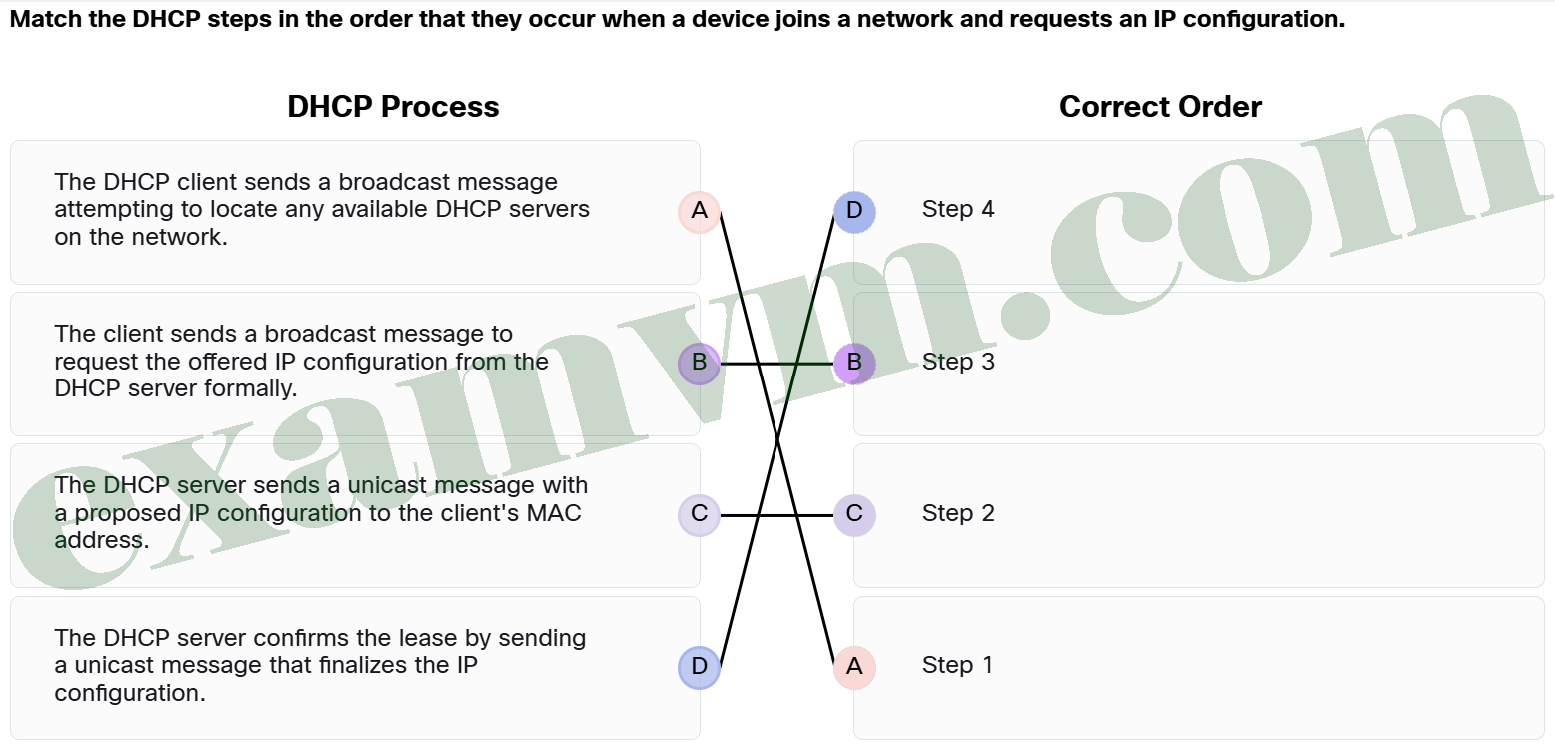
10. Match the DHCP steps in the order that they occur when a device joins a network and requests an IP configuration.
DHCP Process
- The DHCP client sends a broadcast message attempting to locate any available DHCP servers on the network. ==> Step 1
- The client sends a broadcast message to request the offered IP configuration from the DHCP server formally. ==> Step 3
- The DHCP server confirms the lease by sending a unicast message that finalizes the IP configuration. ==> Step 4
- The DHCP server sends a unicast message with a proposed IP configuration to the client’s MAC address. ==> Step 2
11. Which statement describes the route print or netstat -r command output on a Windows host?
- The output provides only information about IPv4 routes and omits any data related to IPv6 routing or local network details.
- The command output displays the host’s routing table, which includes network routes, gateways, and interface information for directing traffic.
- The command output includes the list of all active connections to external networks, including details like the destination address and packet statistics.
- The output shows the list of active network interfaces and their MAC addresses without displaying routing information.
The route print or netstat -r commands provide the host’s routing table, showing network routes, associated gateways, and the interfaces used for forwarding traffic.
12. Tom bought a new wireless router for his home network and is accessing the wireless settings interface to configure the router. He sees multiple options, including Network Mode, SSID, Channel, and SSID Broadcast. Tom wants to ensure his devices can connect to the router and communicate with each other wirelessly without any issues. Which setting ensures that all devices can discover and connect to the wireless network?
- Standard Channel
- Network Mode
- Network Name (SSID)
- Firewall
The SSID (Service Set Identifier) is crucial because all devices must share the same SSID to connect to the same wireless network. While other settings help optimize performance, the SSID identifies the network to which devices connect.
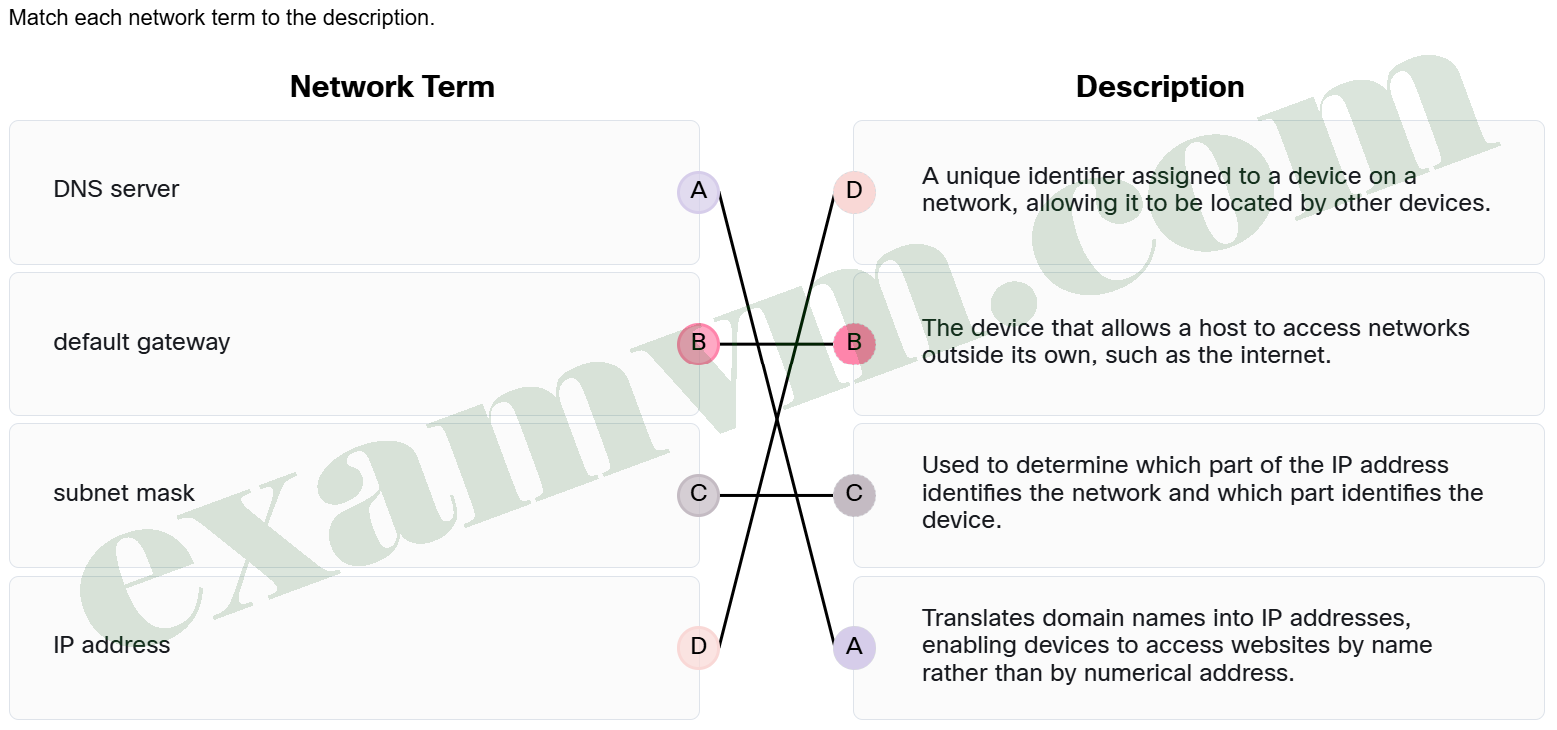
13. Match each network term to the description.
- subnet mask ==> Used to determine which part of the IP address identifies the network and which part identifies the device.
- default gateway ==> The device that allows a host to access networks outside its own, such as the internet.
- DNS server ==> Translates domain names into IP addresses, enabling devices to access websites by name rather than by numerical address.
- IP address ==> A unique identifier assigned to a device on a network, allowing it to be located by other devices.
14. A network technician is configuring a network and needs to assign an IP address and a subnet mask to all devices. The technician wants to ensure efficient address management, security, and performance. Which statement describes a key function of a subnet mask in an IPv4 network?
- A subnet mask controls the number of devices that can be assigned IP addresses based on the network’s MAC address range.
- A subnet mask guarantees that IP addresses are encrypted for secure transmission across the internet.
- A subnet mask determines the maximum number of wireless access points allowed per network.
- A subnet mask defines which portion of an IP address identifies the network, helping devices decide if routing is needed.
The subnet mask allows a device to determine if another IP address is on the same network or requires communication through a gateway. It plays a central role in identifying network boundaries and supports subnetting for efficient IP allocation, security, and performance improvements.
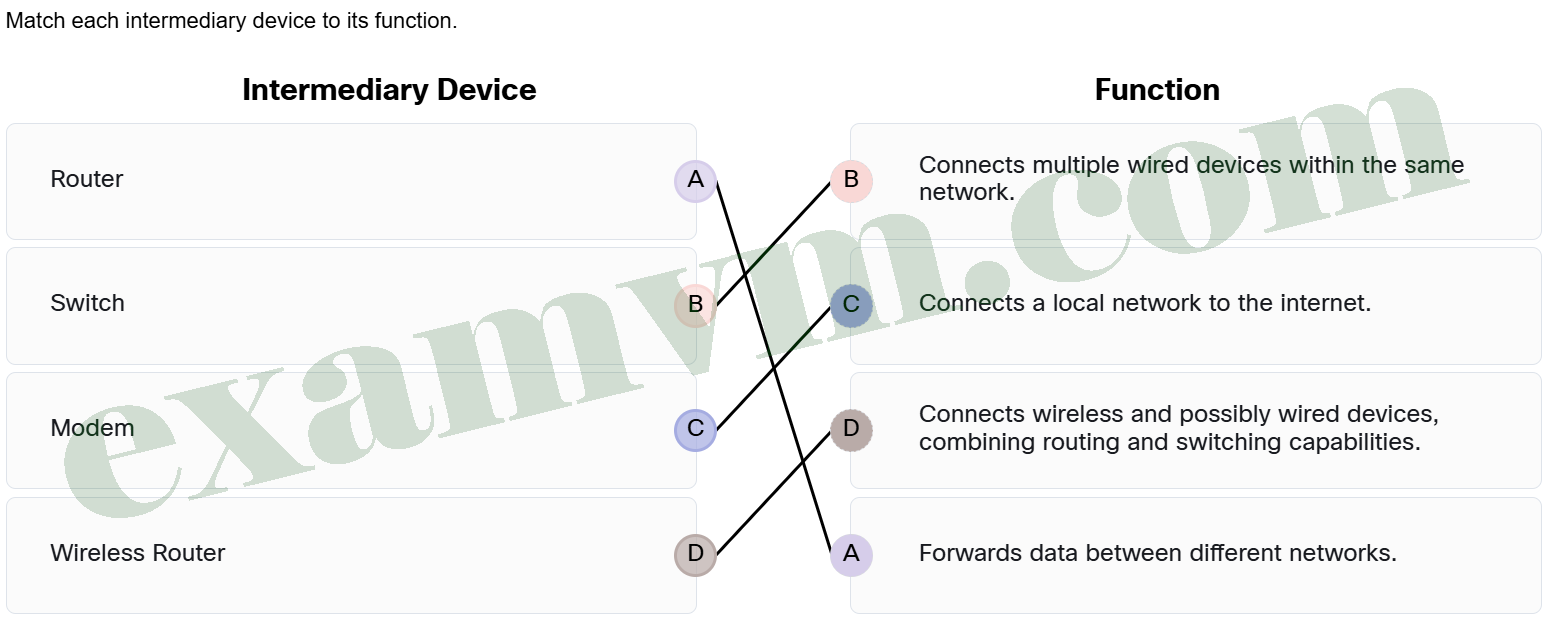
15. Match each intermediary device to its function.
- Modem ==> Connects a local network to the internet.
- Switch ==> Connects multiple wired devices within the same network.
- Wireless Router ==> Connects wireless and possibly wired devices, combining routing and switching capabilities.
- Router ==> Forwards data between different networks.
Each intermediary device plays a unique role in managing and directing network traffic. Switches manage local wired connections, routers handle inter-network communication, and wireless routers combine routing and switching for wireless access. Modems provide internet connectivity to homes or small offices.
16. Which statement explains the key limitation of automatically assigned addresses using APIPA in IPv4 and link-local addresses (LLAs) in IPv6?
- Automatically assigned APIPA and LLA addresses are only valid for communication within the local network segment and do not support routing to remote networks or the internet.
- Devices using APIPA or LLA cannot communicate with any other devices until a DHCP server assigns a new address, even within the local network.
- Both APIPA and IPv6 LLAs assign globally routable IP addresses that allow full internet access but require static DNS entries.
- APIPA addresses allow internet connectivity but are limited to only a small number of IPv4 hosts on a network, while LLAs in IPv6 require manual DNS resolution to function.
Both APIPA and IPv6 LLAs assign globally routable IP addresses that allow full internet access but require static DNS entries.
17. What is required for a wireless network to function?
- A wireless network must have visible antennas on every device for signal transmission.
- Only a wireless router or AP is needed to establish a wireless network, with no need for end devices.
- Two devices with wireless NICs that include a transmitter/receiver tuned to the same frequencies.
- Wireless networks only work if each device has an external USB antenna connected to it.
For a wireless network to work, both the end device (such as a smartphone, tablet, or laptop) and the network device (like a router or access point) must be equipped with wireless NICs that transmit and receive signals at the same radio frequency, often without visible external antennas.