IT Support Essentials Course Final Exam Answers Full 100%
IT Support Essentials Course Final Exam Answers Full 100%
The IT Support Essentials Course Final Exam Answers Full 100% resource is designed to help learners confidently review and understand the key concepts assessed in the final examination of the IT Support Essentials course. This guide focuses on reinforcing practical knowledge rather than simple memorization, covering core areas such as computer hardware, operating systems, networking basics, security fundamentals, troubleshooting methodologies, and professional IT support practices. By using these answers as a study reference, students can strengthen their understanding, identify knowledge gaps, and prepare effectively to achieve a high score while developing real-world skills required for entry-level IT support roles.
1. Why is queue management essential in handling support tickets?
- It helps technicians close only high-priority tickets.
- It ensures that support tickets are handled efficiently and in the right order.
- It allows customers to submit tickets without providing details.
- It limits the number of tickets that can be submitted each day and keeps tickets in the right order.
2. What is one way Artificial Intelligence (AI) tools enhance support teams in ticketing systems?
- By fully replacing human technicians in all tasks
- By automating routine tasks, allowing technicians to focus on complex issues
- By reducing the need for any human expertise
- By handling only the most complex issues for technicians as quickly as possible
3. What is a key tip for using active listening with a customer?
- Interrupt the customer as soon as you realize you have a question.
- Let the customer explain their problem fully before asking clarifying questions.
- Do not interject small phrases like “I see” or “Okay” to avoid interrupting the customer.
- Summarize the customer’s problem only if you are sure you understand it.
4. After resolving a support call with Sarah, Malik documented the following in her ticket:
Ticket Documentation
Issue: Sarah’s laptop keeps disconnecting from the Wi-Fi network every few minutes.
Troubleshooting Steps:
- Confirmed that Sarah’s Wi-Fi router is functioning properly and that other devices are connecting without issues.
- Guided Sarah to update her Wi-Fi adapter driver to the latest version.
- Checked for any interference sources near her laptop (e.g., cordless phones, microwaves).
- Adjusted her laptop’s power settings to prevent the Wi-Fi adapter from turning off to save power.
- Restarted the laptop, and the Wi-Fi connection remained stable for over an hour.
Outcome: Updating the Wi-Fi adapter driver and adjusting power settings resolved the disconnection issue.
Next Steps: Advised Sarah to monitor the connection over the next few days and contact support if the issue reoccurs.
Why is it important for Malik to document each troubleshooting step taken during Sarah’s call?
- It ensures that Sarah will not call back with the same issue.
- It provides a record that can assist with future support and prevents redundant troubleshooting efforts.
- It allows Malik to skip standard troubleshooting steps in future calls and shows that Malik is proficient in ticket documentation.
- It removes the need for other technicians to follow up with Sarah.
5. Why is effective documentation valuable beyond solving the immediate issue?
- It creates a knowledge base that can assist both customers and technicians in the future.
- It reduces the time technicians need to spend on each call.
- It guarantees that customers will not experience similar issues again.
- It eliminates the need for follow-up calls with the customer.
6. Which statement describes a main benefit of using Remote Desktop for macOS?
- It requires less security features so is easier to use with remote users.
- It is an ideal solution for organizations that primarily use Windows devices.
- It includes features like screen sharing, file transfer, and command execution.
- It primarily supports file transfers and software updates which simplifies system upgrades.
7. Which statement describes the main features of Virtual Network Computing (VNC)?
- It requires less internal security if used with Windows devices.
- It is compatible with various platforms and offers free versions.
- It is easy to use therefore more popular for personal use.
- It offers remote control of other desktop computers but lacks various platform compatibility.
8. Which statement describes one benefit of using knowledge bases for troubleshooting?
- They replace the need for internal documentation.
- They offer real-time communication with IT experts.
- They provide structured repositories of official solutions and best practices.
- They prioritize unverified community responses over officially verified solutions.
9. What is the most important step to take before initiating a remote support session?
- Define the problem and gather detailed information by asking clear, specific questions.
- Start the remote connection immediately to save time and work more efficiently.
- Focus on installing the remote access software without understanding the issue.
- Make a safe assumption that the problem is similar to previous cases and apply the same solution.
10. What is a key benefit of using Microsoft Remote Desktop?
- It is compatible with Windows and Linux devices.
- It is paid software that requires a subscription, making it more user-friendly and reliable than other options.
- It allows remote access to any device regardless of operating system.
- It connects to Windows PCs remotely, providing access to files, applications, and network resources.
11. A user reports that their external monitor is not displaying anything. Which two troubleshooting steps are the first recommended actions to take? (Choose two.)
- Reset the monitor resolution settings.
- Replace the monitor immediately, as it is likely defective.
- Update the computer’s operating system to the latest version.
- Check that the monitor has power and the indicator lights are on.
- Ensure the display cables are securely connected and try a different cable if necessary.
12. During a business presentation, a user’s projector unexpectedly shuts down after running for a short period. Upon inspection, they notice that the projector feels very hot. What is the most likely cause and solution?
- The vents are clogged; clean the vents.
- The projector’s bulb is faulty; replace the bulb.
- The input source is incorrect; check the connection settings.
- The projector is in a small enclosure; remove or enlarge the enclosure to ensure proper ventilation.
13. A user reports that the USB devices are not powering down when the computer enters sleep mode, leading to unnecessary battery drain. Additionally, the screen dims unexpectedly, making it difficult to read. What steps should be taken to resolve these issues?
- Disable all power-saving settings in the Control Panel to prevent any automatic adjustments.
- Reinstall the operating system to ensure all power management features are working correctly.
- Enable device power management in Device Manager under USB Root Hub properties and disable adaptive brightness in Display settings.
- Increase the screen brightness manually and avoid using any power management features to prevent dimming, ensuring the display remains at maximum brightness at all times even when the system is not in use.
14. When should a user check for updated drivers for the hardware?
- only when installing new hardware
- at the same time as performing a software update
- when the hardware does not work properly or to prevent future problems
- only if the computer is running slowly, otherwise checking for updated drivers is unnecessary
15. An IT support technician receives a call from a customer whose computer is running slowly after startup. The customer suspects that too many programs are launching automatically when the PC is powered on. The technician needs to check which programs are set to run at startup and disable any unnecessary ones to improve boot time. Which Task Manager tab should the technician use?
- Services
- Processes
- Startup apps
- Performance
16. What is the purpose of Gnome-keyring on Ubuntu Linux?
- It manages and stores security credentials such as passwords, encryption keys, and digital certificates, allowing users and applications to securely access these credentials when needed.
- It monitors system activity and optimizes performance by adjusting system settings based on resource usage, improving the responsiveness of applications and reducing system lag during heavy tasks.
- It automatically updates all system security protocols, including antivirus software and firewalls, to protect against external threats and ensure that the system is always protected against the latest vulnerabilities.
- It provides a secure cloud backup solution for user data, automatically syncing and storing files in a remote cloud service to protect against data loss in case of hardware failure or accidental deletion.
17. What is the primary role of a hypervisor in virtualization?
- It creates an abstraction layer on top of the physical hardware, allocating resources such as CPU, memory, and storage to virtual machines (VMs).
- It adds physical servers to accommodate virtual machines, effectively distributing workloads and ensuring optimal resource access and enhancing scalability and flexibility.
- It provides a backup solution for virtual machines, ensuring all data is automatically stored in cloud storage.
- It installs and manages the operating system on virtual machines to ensure compatibility with hardware components.
18. Which command provides a list of users currently logged into a Linux system and their corresponding terminal sessions?
- who
- login
- users
- ifconfig
19. Which statement describes the importance of understanding display settings in macOS?
- It allows technicians to install third-party applications.
- It helps diagnose and resolve common issues such as blurry text and incorrect resolution.
- It ensures that all display hardware components are recognized and configured optimally.
- It guarantees that the Mac will always have the latest operating system installed and functioning properly.
20. A user reports that the Mac screen appears too warm or yellow. What should the support technician do to resolve this issue?
- Check for display driver issues.
- Increase the screen brightness in System Settings > Displays.
- Turn off True Tone and check the Night Shift settings in System Settings > Displays.
- Restart the Mac in Safe Mode and then adjust the refresh rate in System Settings > Displays.
21. Which application permission is essential for a ride-sharing app, like Uber, to function properly?
- Location
- Storage
- Camera
- Contacts
22. Which cloud provider is recommended for customers focused on innovation around data, analytics, AI/ML, or open-source and cloud-native technologies?
- Amazon Web Services (AWS)
- Microsoft Azure
- Google Cloud Platform (GCP)
- IBM Cloud
23. After implementing a plan to fix a mobile device issue, what should be done if the problem is not immediately resolved?
- Restart the device and check if the issue is resolved.
- Gather additional information from online forums and manufacturer FAQs.
- Document the changes made and note the specific troubleshooting process followed.
- Do more research to determine the exact cause and take further corrective actions.
24. Which action should be taken during the documentation step to ensure proper documentation of the changes are made?
- Mark the ticket as resolved and inform the customer that no further steps are necessary.
- Skip the documentation of components used if they are not critical to the repair process.
- Discuss the solution with the customer, document the steps taken, and provide the customer with all relevant paperwork.
- Focus on documenting the time spent, as this is the most critical piece of information needed to assist future troubleshooting processes.
25. What happens if an iOS user forgets the passcode?
- The device will be locked permanently, and no data can be recovered.
- The user will need to perform a full restore from an iTunes or iCloud backup to regain access.
- The user can easily retrieve the forgotten passcode by logging into their Apple ID and iCloud account, which will display the current passcode.
- The device will automatically send a recovery link to the user’s registered email address, allowing them to reset the passcode without losing any data.
26. A network administrator notices that one of the company’s computers is being used to launch attacks against external targets without the user’s knowledge. The system seems to be acting as a base for unauthorized internet activity. What type of Trojan horse is most likely responsible?
- Remote-access
- File Transfer Protocol (FTP)
- Destructive
- Proxy
27. Match the types of malware with their correct descriptions.
- Spyware ==> Gathers information about the user to send to threat actors, potentially capturing sensitive data.
- Rootkit ==> Provides unauthorized access to a computer and can conceal its presence.
- Ransomware ==> Denies access to files by encrypting them and demands a ransom to decryption.
- Adware ==> Can display unsolicited advertising and may open multiple pop-up windows.
28. During a recent cybersecurity incident involving unauthorized access to sensitive employee data, the Computer Security Incident Response Team (CSIRT) was formed to manage the response. To effectively handle the situation, several groups within the organization were involved. Which group is responsible for reviewing incident policies and ensuring compliance with guidelines?
- IT Support
- Management
- Legal Department
- Public Affairs and Media Relations
29. An IT support technician receives a report from an end user who is concerned about unusual behavior on their corporate device. What is the primary purpose of host-based anti-malware software in this context?
- to enhance the speed of the network connection
- to provide a user-friendly interface for the end user
- to detect and mitigate viruses and malware on the device
- to monitor all network traffic for any possible suspicious activity
30. What is one of the most effective ways to enhance the security of your online accounts beyond using strong passwords?
- Create your password with upper and lower case digits and special characters.
- Enable Multi-Factor Authentication (MFA) for an additional layer of security.
- Change your password when you are prompted to ensure continued security.
- Use the same password for multiple accounts for convenience and accessibility.
31. Match each problem with its potential solution.
- deleted authenticator app by mistake ==> User must re-register MFA on a new device. May need to contact support.
- app codes not working ==> Make sure “Set Automatically” is turned on for date and time.
- lost or broken phone / tablet ==> Help reset MFA using backup codes or recovery options. May need admin help.
- unable to scan QR code ==> Make sure they are using the current authenticator app and that the camera works.
32. A staff member at a medical clinic scans several patient documents using a flatbed scanner, but the resulting images are blurry and missing parts of the page. What is the most likely reason for the problem?
- The scanner’s Wi-Fi connection is unstable.
- The scanner resolution is set to the highest DPI available.
- The documents were not aligned properly on the scanner glass.
- The scanner is saving files to a shared folder instead of the desktop.
33. A user says they cannot access their external drive and receive an “Access Denied” error message. What should be the first step in troubleshooting?
- Check for faulty cables or ports.
- Reformat the drive and restore from backup.
- Try connecting the drive to a different computer.
- Verify the drive is not write-protected and check permissions.
34. Why are file and folder permissions important in a work or school computing environment?
- They allow any user to bypass restrictions for faster collaboration on shared files.
- They control what actions users can take, helping enforce security and prevent unauthorized changes.
- They ensure all users have identical access to system files and settings, ensuring easy accessibility for users.
- They permanently lock sensitive files to prevent anyone from making changes.
35. Maria is a staff member at a small business. One morning, she forgets the password to her work computer. The computer is not connected to a domain, and she cannot log in. As an on-site IT support technician, what is the most appropriate way to help Maria regain access?
- Have Maria try to reset her password using the “Forgot password” link on the login screen.
- Use Active Directory Users and Computers (ADUC) to reset her domain account password.
- Log in with an administrator account and use the Local Users and Groups Manager to reset Maria’s password.
- Instruct Maria to wait until the system unlocks her account automatically after the time limit and then log in again.
36. Why is Network Address Translation (NAT) important for a home network?
- It dynamically translates website names into IP addresses so users can connect more easily.
- It encrypts IP addresses and ensures that only secure connections are allowed through the router.
- It finds the most efficient path for data to travel across multiple networks and reach its destination.
- It helps multiple devices within a private network access the internet using one shared public IP address.
37. An IT support technician is helping a remote employee who reports slow connectivity to a company server. The technician suspects the issue lies somewhere along the path between their computer and the server. Which command-line tool should be used to follow the path and identify where delays might be occurring?
- ping
- netstat
- tracert
- ipconfig
38. Juanita is setting up a wireless network in her office to provide coverage throughout the building. She decides to place several wireless access points (APs) in different rooms. Her devices will use their wireless NICs to connect to the nearest AP. What role do wireless access points play in Juanita’s network setup?
- APs act as a switch, using the MAC address of wireless devices to provide internet access.
- APs enable the SSID broadcast in order for wireless devices to connect the internet.
- APs extend wireless coverage and connect devices to the network.
- APs ensure that all connected devices are within 10 feet of the router for optimal signal strength.
39. What is a common problem with WLANs that can be analyzed by using a wireless signal analyzer and possibly resolved by adding access points?
- Devices that fail to connect to the network due to mismatched SSIDs.
- Routers that are incompatible with newer Wi-Fi standards like 802.11ax.
- Using Ethernet cables with a length exceeding 100 meters for PoE delivery.
- Devices that are too far from the access point, resulting in weak signals or dead zones.
40. Which statement about IP addresses is correct?
- A device’s IP address usually changes when it moves to a different network.
- An IP address is permanently assigned and doesn’t change regardless of the network.
- IP addresses are hard-coded by the device manufacturer.
- IPv4 addresses are always represented in hexadecimal format.
41. A user connects a stereo system to the microphone port on a desktop computer and reports poor sound quality and volume distortion. What is the most likely reason for this issue?
- The microphone port only supports wireless input devices.
- The stereo system is not compatible with digital audio input.
- The line out port should be used for any external audio equipment.
- The user should have connected the stereo system to the line in port instead.
42. A technician is helping a customer choose a universal charging and data cable for their new Android phone and MacBook. Which cable type should the technician recommend?
- USB-C
- Lightning
- Micro-USB
- USB Type-A
43. A user installs a graphic-intensive application on the work laptop, but it frequently crashes or freezes. The laptop meets the minimum RAM and disk space requirements. What is the most likely cause of the issue?
- The user did not disable background applications during installation.
- The application was not installed with administrator privileges.
- The laptop is running an outdated version of the operating system.
- The integrated GPU on the laptop does not meet the requirements of the applications.
44. Which Windows tool allows a technician to view detailed hardware specifications, such as the processor type and installed RAM, to assist with troubleshooting?
- Event Viewer, because it logs system activity and errors, including some related to hardware initialization and device startup.
- Task Manager, because it displays permanent hardware details and system configuration files.
- The ipconfig command, because it shows memory usage and real-time processor activity.
- System Information, because it provides a comprehensive summary of the computer’s hardware and system components.
45. A technician is assisting a user who needs to install new software. To ensure compatibility, the technician wants to quickly review the basic hardware and operating system information on the Mac. Which built-in tool should the technician use to access this overview?
- Activity Monitor
- System Settings
- About This Mac
- Console
46. Which type of software is primarily responsible for enabling the operating system to communicate with newly installed hardware components such as a graphics card or a printer?
- Driver
- Firmware
- Application software
- Utility program
47. A high-performance gaming PC builder wants to ensure their power supply can support the latest generation of GPUs. Which power supply form factor should they choose to meet these power requirements?
- AT Extended (ATX)
- ATX12V
- EPS12V
- ATX 3.0
48. Match each chipset-related term with the correct description.
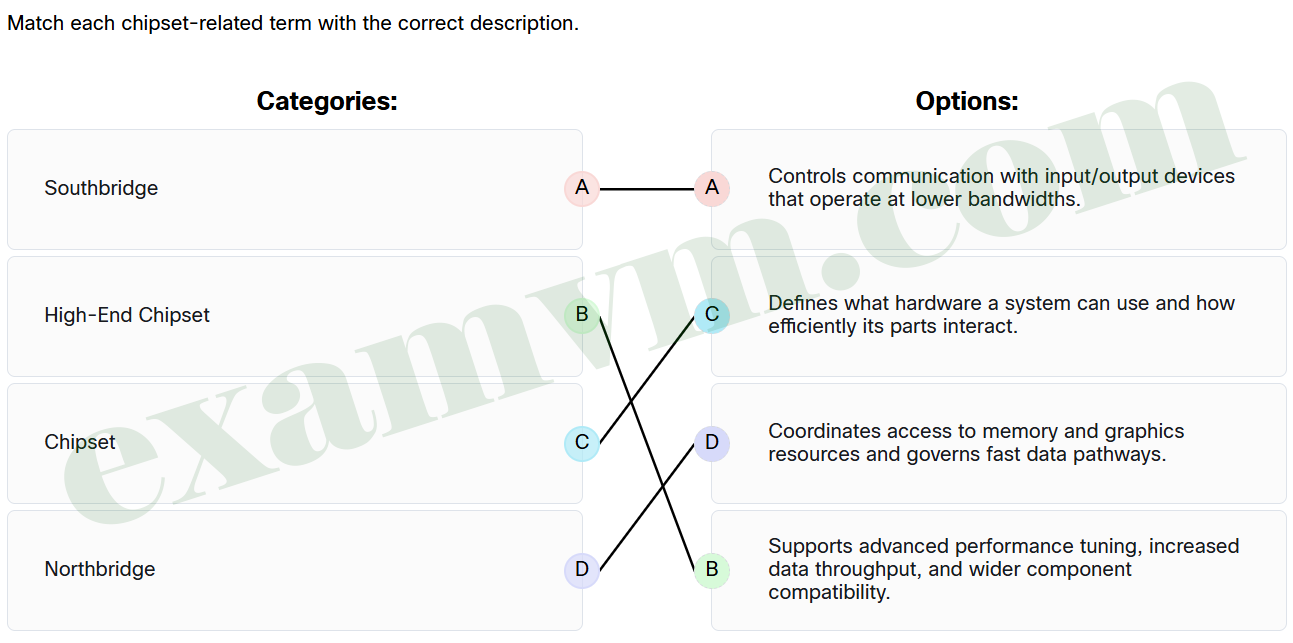
- Southbridge ==> Controls communication with input/output devices that operate at lower bandwidths.
- High-End Chipset ==> Supports advanced performance tuning, increased data throughput, and wider component compatibility.
- Chipset ==> Defines what hardware a system can use and how efficiently its parts interact.
- Northbridge ==> Coordinates access to memory and graphics resources and governs fast data pathways.
49. Why is installing the correct driver essential when setting up a new hardware device on a computer?
- The driver allows the operating system to communicate with the device using appropriate instructions the hardware can understand.
- Drivers are required only for networked devices and are automatically handled by the router or firewall.
- Most modern devices do not need drivers because they use universal plug-and-play protocols that eliminate the need for software translation.
- Drivers are mainly used to configure the user interface and are not critical to core hardware functionality.
50. Match each item with its description.
- Keep disposal records. ==> Tracks what was disposed, when and how, for audits and compliance.
- Wipe or destroy storage devices. ==> Ensures data is permanently removed, before recycling, to protect privacy.
- R2 Certification ==> Focuses on responsible recycling with data protection and worker safety.
- e-Stewards Certification ==> Prohibits unsafe waste exports and enforces strict environmental rules.
51. Match the terms with their correct descriptions.
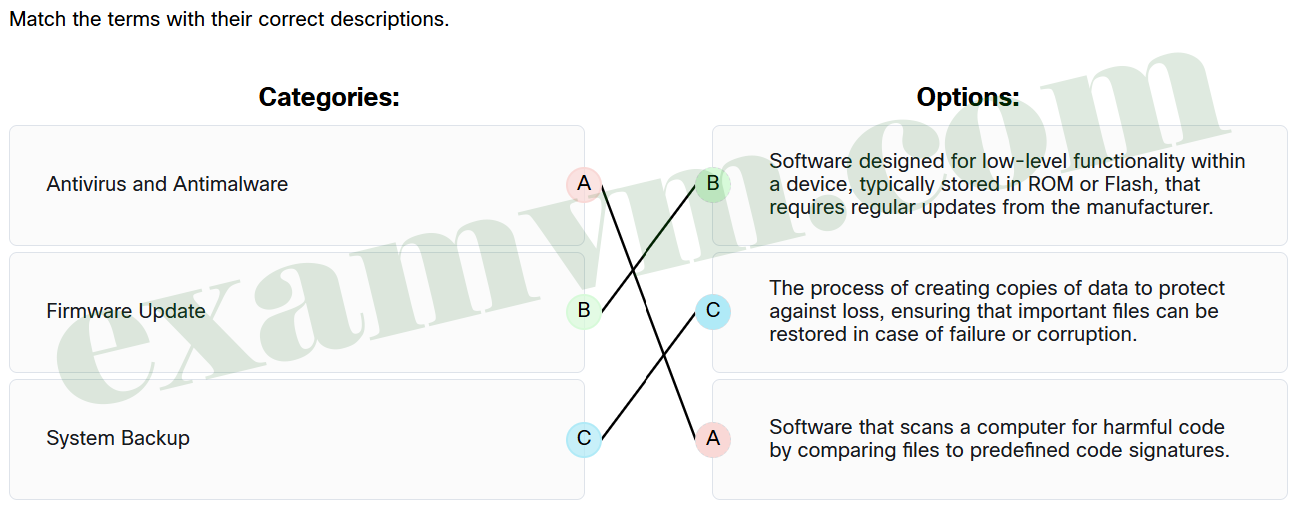
- Antivirus and Antimalware ==> Software that scans a computer for harmful code by comparing files to predefined code signatures.
- Firmware Update ==> Software designed for low-level functionality within a device, typically stored in ROM or Flash, that requires regular updates from the manufacturer.
- System Backup ==> The process of creating copies of data to protect against loss, ensuring that important files can be restored in case of failure or corruption.
52. Match each term related to virtualization with its correct description.
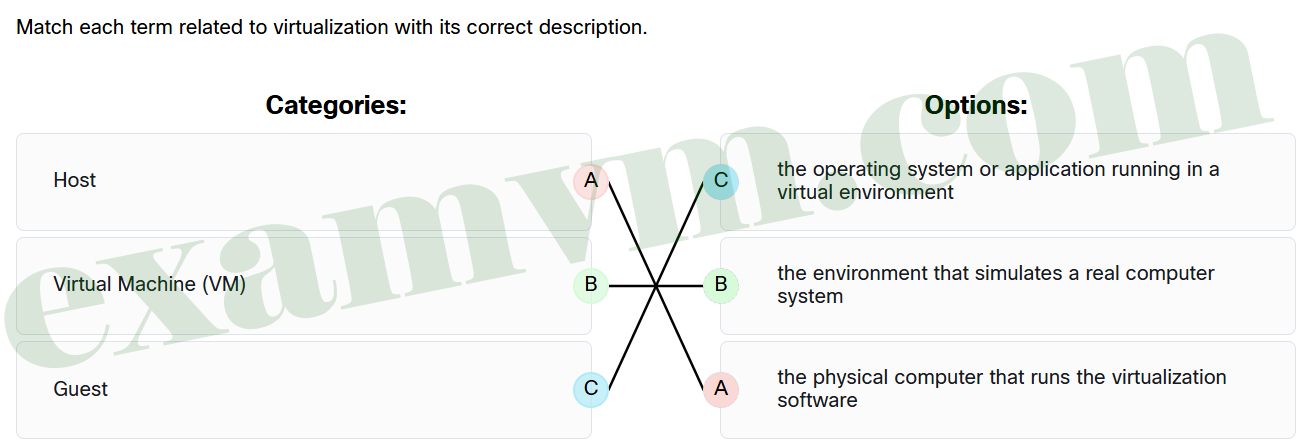
- Host ==> the physical computer that runs the virtualization software
- Virtual Machine (VM) ==> the environment that simulates a real computer system
- Guest ==> the operating system or application running in a virtual environment
53. A Mac user reports that an application is still not functioning properly despite having the necessary permissions. What is the next troubleshooting step after ensuring the operating system is up to date?
- Completely remove the application from the Finder, then reinstall it.
- Temporarily turn off the antivirus software to see if that resolves the issue.
- Check for updates in the application itself to see if a new version is available.
- Restore the computer to an earlier backup to ensure all applications work seamlessly.
54. A regional healthcare network wants to share patient data securely among its affiliated hospitals while ensuring compliance with strict healthcare regulations like HIPAA. Which cloud model would best meet their needs?
- Public Cloud
- Private Cloud
- Community Cloud
- Hybrid Cloud
55. What is one key advantage of mapping a shared drive using the SMB protocol on a local network?
- It allows users to access cloud-based applications without logging in.
- It automatically encrypts all shared files with end-to-end security, providing optimum security.
- It makes shared folders appear in File Explorer, allowing easy access to team files.
- It moves all shared files to the user’s desktop to avoid network usage.
56. A technician is troubleshooting why a customer’s USB-C docking station isn’t charging their laptop or providing video output, even though the USB-C cable fits in the port. The technician suspects a mismatch in USB standards. What is the most likely explanation?
- The USB-C cable was plugged in upside-down, preventing video signals from being transmitted.
- The port supports USB 3.0 speeds but lacks USB4 or Thunderbolt 4 capabilities required for power delivery and video output.
- The docking station is incompatible because it uses the older USB Type-A standard and cannot connect to newer laptops.
- The laptop must be fully powered off before connecting to a USB-C docking station to enable data and power transfer.
57. Why is it important for technicians to communicate with customers throughout the ticket resolution process?
- To manage customer expectations, provide updates, and ensure customers feel heard and valued.
- To prioritize only low-priority tickets and postpone high-priority ones.
- To avoid working on tickets and focus on other tasks.
- To discourage customers from submitting future support requests.
58. Why are Service Level Agreements (SLAs) important in help desk operations?
- SLAs focus on minimizing the number of tickets assigned to each technician.
- SLAs only apply to high-priority tickets and are not used for lower-priority issues.
- SLAs define the maximum number of tickets a technician can handle per day.
- SLAs set clear expectations for both customers and support teams, ensuring timely responses and resolutions.
59. What is a helpful tip when dealing with a talkative customer?
- Allow the customer to talk for as long as they want without stepping in.
- Encourage non-problem related conversation by asking social questions like “How are you today?”
- Politely step in to refocus the customer after allowing them to talk for about one minute.
- Avoid asking closed-ended questions once you have regained control of the call.
60. What is a recommended tip when helping an inexperienced customer?
- Allow the customer to talk for as long as they want without any intervention.
- Encourage non-problem related conversation by asking questions like “How are you today?”.
- Let the customer explain the problem, but don’t ask closed-ended questions after regaining control of the call.
- Use plain terms instead of more complex computer or networking jargon.
61. Which type of information is most important to collect when troubleshooting a laptop that cannot connect to Wi-Fi?
- the brand and model of the laptop
- details about timing, recent changes, and observed behaviors
- the customer’s preference for wired or wireless connections
- a list of all devices previously used on the Wi-Fi network that are having connection issues
62. Which statement best summarizes the troubleshooting process outline?
- Solving problems intuitively based on past experiences without structured steps.
- Relying exclusively on preventive maintenance to avoid the need for troubleshooting.
- Following a systematic eight-step approach, including defining the problem, gathering information, and documenting the resolution.
- Prioritizing data protection above all else, without the need for problem identification, planning, or documentation of observed issues.
63. Why is remote access software considered an essential tool for modern IT support?
- It guarantees that all technical issues can be resolved instantly without user involvement.
- It replaces all other forms of IT support, including in-person assistance.
- It enables IT professionals to assist users from any location while ensuring security, efficiency, and clear communication.
- It eliminates the need for troubleshooting and documentation processes, and IT expertise.
64. Once a technician has an understanding of how remote access works, what is the next step to prepare for a remote session?
- Rely on a single tool for all remote access scenarios to remain efficient.
- Skip tool selection to save time during troubleshooting.
- Explore specific remote access tools, their features, and their benefits.
- Assume all remote access tools function identically.
65. A user reports that images on the display appear distorted, with strange colors and artifacts. After testing different cables and monitors, the issue persists. What is the most likely cause and solution?
- The monitor is defective; replace it with a new one.
- The GPU is faulty or malfunctioning; replace the GPU.
- The refresh rate is too low; increase it in display settings.
- The display resolution is set incorrectly; adjust it in display settings.
66. What is the first step to begin using Google Drive?
- Configure file syncing options.
- Download Google Drive desktop application.
- Create a Google account at accounts.google.com/signup.
- Purchase a Google One subscription and download the application.
67. How can a user typically access the command line interface (CLI) in a GUI-based operating system like macOS or Linux?
- A user can restart the computer in safe mode.
- A user can press Ctrl+Alt+Delete.
- A user can use a terminal emulator application.
- A user can disconnect any external devices.
68. What is the primary function of Time Machine in macOS?
- It optimizes system performance by closing background apps.
- It scans for viruses and malware to protect your data.
- It automatically creates incremental backups of files, applications, and system settings.
- It synchronizes files across multiple Apple devices to ensure the user always has the latest version of documents, photos, and apps, regardless of the device.
69. What is the primary purpose of Mobile Device Management (MDM) in an organization?
- to remotely monitor, secure, and optimize mobile devices
- to provide faster internet connections on any mobile devices
- to ensure only company-owned devices can connect to the network
- to track employee locations using their company-owned mobile devices
70. What should an IT support technician recommend if a customer’s mobile device is lost or stolen and attempts to locate it have failed?
- Perform a factory reset on the device to wipe all data immediately, ensuring no one can access the information, even if the device is found later.
- Use the remote lock and remote wipe features to secure the device and protect personal information.
- Ask the customer to contact their mobile carrier to deactivate the SIM card, which will prevent calls and data usage, making the device useless to whoever finds it.
- Advise the customer to wait a few days in case the device turns up, as many lost devices are often recovered or returned by honest people.